Update #3 - Hardening Security of the BookStack.
After migrating my BookStack documentation system to a public-facing VPS, my next priority was to harden the server. The goal was to lock down remote access, guard against brute-force attacks, and ensure the system was updated automatically, all while maintaining reliable access for legitimate admin use.
The Setup
The VPS is running Ubuntu 22.04 LTS, hosting BookStack on a full LAMP stack. With the public site live, it was time to secure the perimeter.
The Process
1. Hardened SSH Configuration
I edited /etc/ssh/sshd_config to improve SSH security:
-
Disabled root login
-
Disabled password-based authentication
-
Enforced key-based authentication
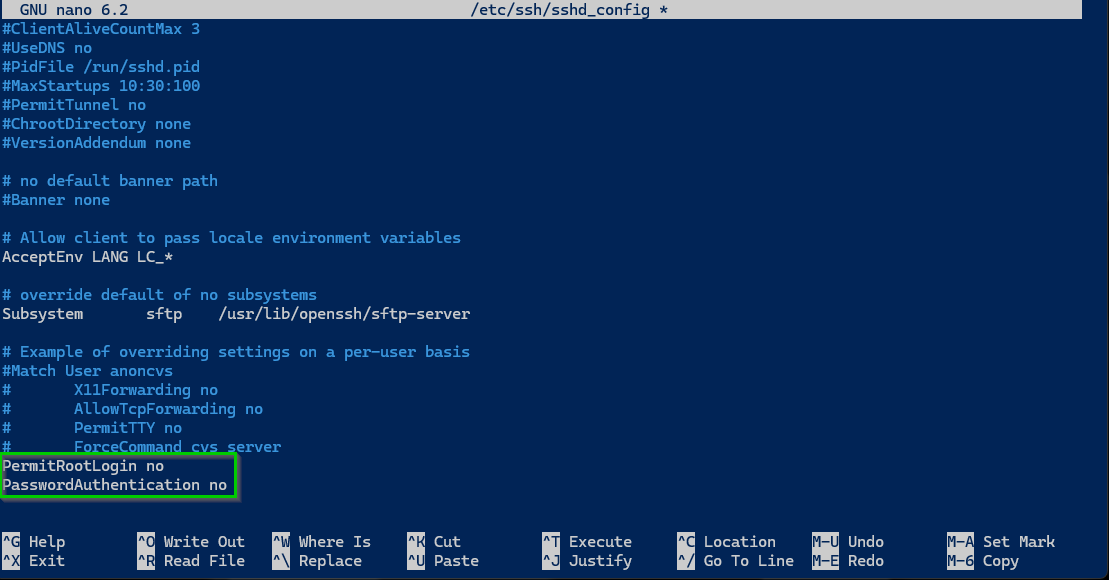
Once updated, I restarted SSH:
sudo systemctl restart ssh2. Enabled UFW Firewall
I verified UFW firewall settings to ensure only necessary traffic was allowed:
-
OpenSSH for SSH access
-
Apache Full for BookStack
3. Installed and Configured Fail2Ban
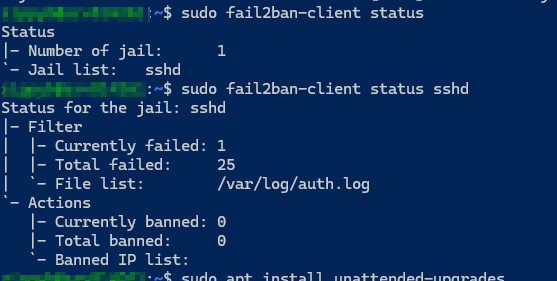
Fail2Ban helps block brute-force attacks. After installation, it was monitoring the SSH log (/var/log/auth.log).
sudo apt install fail2ban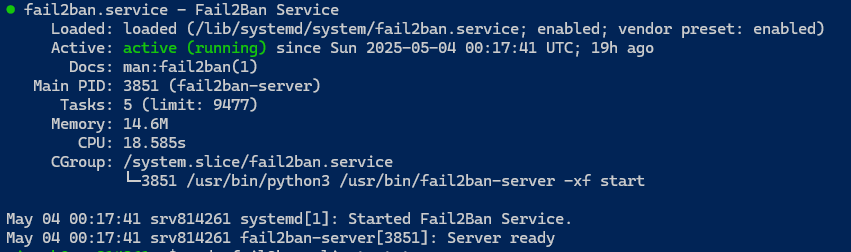
Screenshot: Fail2Ban Jail Status
4. Enabled Unattended Security Updates
To keep the VPS patched automatically, I installed and configured unattended upgrades:
sudo apt install unattended-upgrades
sudo dpkg-reconfigure unattended-upgrades
This ensures security updates are applied daily with minimal overhead.
The Result
The VPS is now protected with hardened SSH access, firewall filtering, brute-force detection, and automatic security patching, while keeping full control over my public documentation setup.
What I Learned
-
A single open SSH port can attract attention fast
-
Disabling root login and passwords makes a big difference
-
Fail2Ban provides great peace of mind
-
UFW simplifies firewall management
-
Automated updates are essential for long-term hardening