# Update #17 - Installing Root Kit Detection on Virtual Private Server

#### **Date:** May 30, 2025  
**Category:** Security / System Monitoring

#### I am going to install rootkit detection on my VPS. This is good practice, although not many Linux servers are attacked in this way.  
  
In this guide, I'll be installing and using `chkrootkit` and `rkhunter`.

Update and Upgrade:

```bash
sudo apt update && sudo apt upgrade -y
```

Install `chkrootkit` :

```bash
sudo apt install chkrootkit -y
```

[![2025-05-30 15_52_03-Settings.png](https://docs.natenetworks.com/uploads/images/gallery/2025-05/scaled-1680-/levQPvxKyflnC9BY-2025-05-30-15-52-03-settings.png)](https://docs.natenetworks.com/uploads/images/gallery/2025-05/levQPvxKyflnC9BY-2025-05-30-15-52-03-settings.png)

Run the scan:

```bash
sudo chkrookit
```

[![2025-05-30 16_00_01-Edit Page Draft _ BookStack — Mozilla Firefox.png](https://docs.natenetworks.com/uploads/images/gallery/2025-05/scaled-1680-/qsVhSMkqZdrixZPI-2025-05-30-16-00-01-edit-page-draft-bookstack-mozilla-firefox.png)](https://docs.natenetworks.com/uploads/images/gallery/2025-05/qsVhSMkqZdrixZPI-2025-05-30-16-00-01-edit-page-draft-bookstack-mozilla-firefox.png)

There was nothing found in most cases, but since I use `Fail2Ban` , these files are from its own test files, which include `.htpasswd `and `.htaccess`examples. These are **not actually security threats and are normal and expected.** `chrootkit`**flags these because `.htaccess` and `.htpasswd` can sometimes hide malicious behavior - but in this context, they're **safe**.** The two `.build-id` are also **normal and expected.** They are part of the Linux Kernel's `vdso`(Virtually Dynamically-linked Shared Object), which helps with performance for certain syscalls.  
  
So this is clean, `chrootkit` is doing its job of alerting me of **potentially dangerous file types**, not actual infections.

<p class="callout info">In this case, all flagged items are **false positives**.</p>

####   
Now I'm going to move on and install `RKHunter`:  


1.) Install RKHunter

```bash
sudo apt update
sudo apt install rkhunter -y
```

2.) Open RKHunter's Config File:

```bash
sudo nano /etc/rkhunter.conf
```

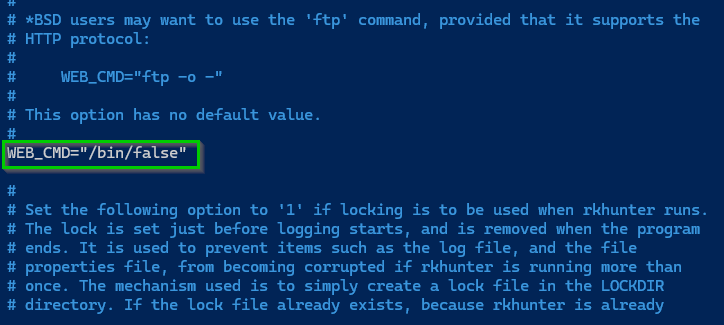
Modify the following  
  
Comment this out: use Ctrl + W to search the file and then type WEB\_CMD

[![2025-05-30 17_06_14-Nathaniel Nash — All Items — 1Password.png](https://docs.natenetworks.com/uploads/images/gallery/2025-05/scaled-1680-/xnaIzXeXrYGVHKg0-2025-05-30-17-06-14-nathaniel-nash-all-items-1password.png)](https://docs.natenetworks.com/uploads/images/gallery/2025-05/xnaIzXeXrYGVHKg0-2025-05-30-17-06-14-nathaniel-nash-all-items-1password.png)
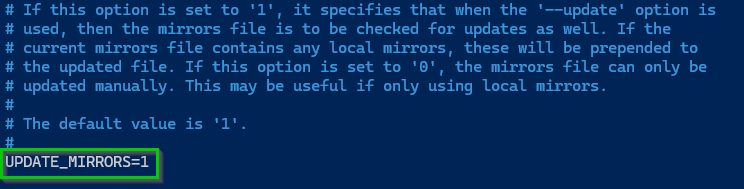
Use CTRL+W to search for UPDATE\_MIRRORS and change it to 1

[![2025-05-30 17_31_03-Edit Page Draft _ BookStack — Mozilla Firefox.png](https://docs.natenetworks.com/uploads/images/gallery/2025-05/scaled-1680-/og1QpAfZglCoN7lK-2025-05-30-17-31-03-edit-page-draft-bookstack-mozilla-firefox.png)](https://docs.natenetworks.com/uploads/images/gallery/2025-05/og1QpAfZglCoN7lK-2025-05-30-17-31-03-edit-page-draft-bookstack-mozilla-firefox.png)
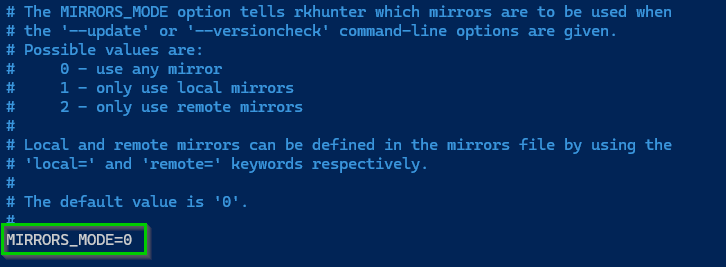
Do the same for MIRRORS\_MODE and set that to 0

[![2025-05-30 17_33_33-Edit Page Draft _ BookStack — Mozilla Firefox.png](https://docs.natenetworks.com/uploads/images/gallery/2025-05/scaled-1680-/NZhyBHTQJmAkiPDK-2025-05-30-17-33-33-edit-page-draft-bookstack-mozilla-firefox.png)](https://docs.natenetworks.com/uploads/images/gallery/2025-05/NZhyBHTQJmAkiPDK-2025-05-30-17-33-33-edit-page-draft-bookstack-mozilla-firefox.png)
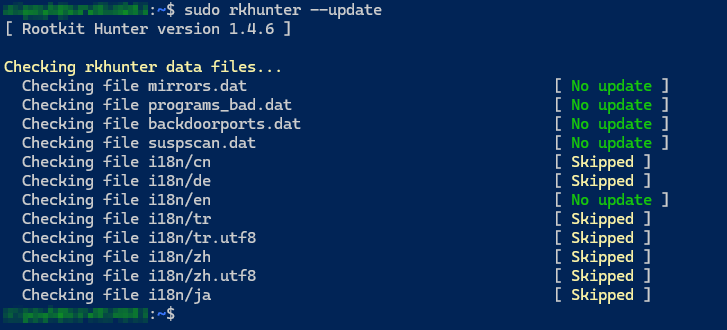
3.) Update RKHunter's Data Files

```bash
sudo rkhunter --update
```

<p class="callout info">This pulls the latest rootkit definitions and mirror lists.</p>

This is what you want it to look like, since it was freshly installed, nothing new was added:

[![2025-05-30 17_34_30-Edit Page Draft _ BookStack — Mozilla Firefox.png](https://docs.natenetworks.com/uploads/images/gallery/2025-05/scaled-1680-/k0xb2N77325pEQsl-2025-05-30-17-34-30-edit-page-draft-bookstack-mozilla-firefox.png)](https://docs.natenetworks.com/uploads/images/gallery/2025-05/k0xb2N77325pEQsl-2025-05-30-17-34-30-edit-page-draft-bookstack-mozilla-firefox.png)
Now lets run it:

```bash
sudo rkhunter --check
```

It will check for possible root kits and the output should look like this:

[![image.png](https://docs.natenetworks.com/uploads/images/gallery/2025-05/scaled-1680-/jideOtT3rV3zlP2w-image.png)](https://docs.natenetworks.com/uploads/images/gallery/2025-05/jideOtT3rV3zlP2w-image.png)
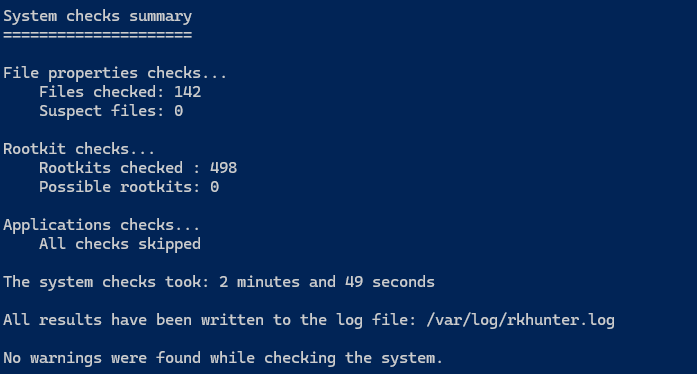
Now you will have to make key presses by hitting ENTER to continue, in order to automate this we can run:

```bash
sudo rkhunter --check --sk
```

or the full command:

```bash
sudo rkhunter --check --skip-keypress
```

This will be useful when saving it to a logfile or scheduling it as a cron job.

It runs the scan **fully unattended**.  
You can save the output.  
Allows for scripts or email alerts!