# Update #16 - Installing Docker and Prepping My VPS for App Expandability.

#### **Date:** May 23, 2025  
**Category:** Server Management / DevOps  
**Backlink:** *N/A (First Entry in Docker Expansion Series)* My objective was to get Docker up and running on my existing VPS without migrating BookStack (yet). I wanted to ensure I could containerize and run additional apps while keeping BookStack fully operational, with no downtime during this transition. This setup gives me the flexibility to explore other projects in isolated environments while preserving my current production setup.  
  
Setting this up can be found here: [https://docs.docker.com/engine/install/ubuntu/](https://docs.docker.com/engine/install/ubuntu/)

I'll run apt update to make sure my packages are updated.

```bash
sudo apt update
```

[![image.png](https://docs.natenetworks.com/uploads/images/gallery/2025-05/scaled-1680-/aWGUSrWD7egAWInU-image.png)](https://docs.natenetworks.com/uploads/images/gallery/2025-05/aWGUSrWD7egAWInU-image.png)

I also used app auto-remove to get rid of some old PHP packages:

```bash
sudo apt autoremove
```

[![image.png](https://docs.natenetworks.com/uploads/images/gallery/2025-05/scaled-1680-/nqo3QfuevLpGhIBm-image.png)](https://docs.natenetworks.com/uploads/images/gallery/2025-05/nqo3QfuevLpGhIBm-image.png)

So to install Docker, we need to build our app source line step-by-step.

Getting my system architecture:

```bash
dpkg --print-architecture
```

[![image.png](https://docs.natenetworks.com/uploads/images/gallery/2025-05/scaled-1680-/Zs9fYvl8lhIqrWHq-image.png)](https://docs.natenetworks.com/uploads/images/gallery/2025-05/Zs9fYvl8lhIqrWHq-image.png)

So I see it is amd64

I'll also need to get my Ubuntu Codename:

```bash
lsb_release -cs
```

[![image.png](https://docs.natenetworks.com/uploads/images/gallery/2025-05/scaled-1680-/xUgnHFwDDMoQVNr5-image.png)](https://docs.natenetworks.com/uploads/images/gallery/2025-05/xUgnHFwDDMoQVNr5-image.png)

So I see it is jammy

Now I can construct the Docker source line manually:

```bash
echo "deb [arch=amd64 signed-by=/etc/apt/keyrings/docker.gpg] https://download.docker.com/linux/ubuntu jammy stable"
```

This code below writes it into the APT sources list at /etc/apt/sources.list.d/docker.list

```bash
echo "deb [arch=amd64 signed-by=/etc/apt/keyrings/docker.gpg] https://download.docker.com/linux/ubuntu jammy stable" | sudo tee /etc/apt/sources.list.d/docker.list > /dev/null
```

Now we can update the packages:

```bash
sudo apt update
```

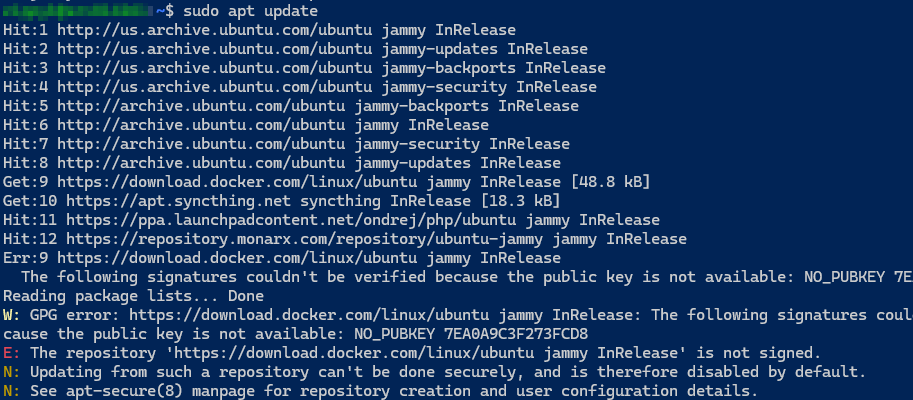
<p class="callout warning">I got an error like this</p>

[![image.png](https://docs.natenetworks.com/uploads/images/gallery/2025-05/scaled-1680-/hCIkmcEmj7Rvacjr-image.png)](https://docs.natenetworks.com/uploads/images/gallery/2025-05/hCIkmcEmj7Rvacjr-image.png)

So I need to re fetch and add Docker's GPG Key Securely:

```bash
curl -fsSL https://download.docker.com/linux/ubuntu/gpg | \
  sudo gpg --dearmor -o /etc/apt/keyrings/docker.gpg
```

Then enure it is readable by APT:

```bash
sudo chmod a+r /etc/apt/keyrings/docker.gpg
```

Then update the package list again:

```bash
sudo apt update
```

Proceed with installing Docker:

```bash
sudo apt install -y docker-ce docker-ce-cli containerd.io docker-buildx-plugin docker-compose-plugin
```

This installs the docker engine, CLI Tools, Container runtime,, and Docker Compose plugin (V2)

[![dcb30c35-07c0-45cb-b6e3-2cd33c200254.png](https://docs.natenetworks.com/uploads/images/gallery/2025-05/scaled-1680-/V0m1tkdZO5nGhngU-dcb30c35-07c0-45cb-b6e3-2cd33c200254.png)](https://docs.natenetworks.com/uploads/images/gallery/2025-05/V0m1tkdZO5nGhngU-dcb30c35-07c0-45cb-b6e3-2cd33c200254.png)
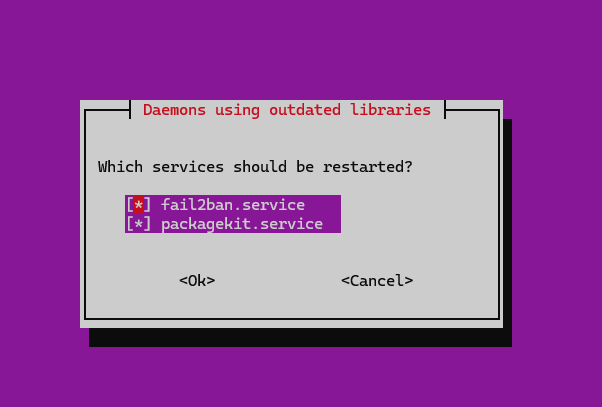
I left both services checked for restart and verified everything is installed.

[![image.png](https://docs.natenetworks.com/uploads/images/gallery/2025-05/scaled-1680-/Sxo6gEdlMWHjmqKY-image.png)](https://docs.natenetworks.com/uploads/images/gallery/2025-05/Sxo6gEdlMWHjmqKY-image.png)
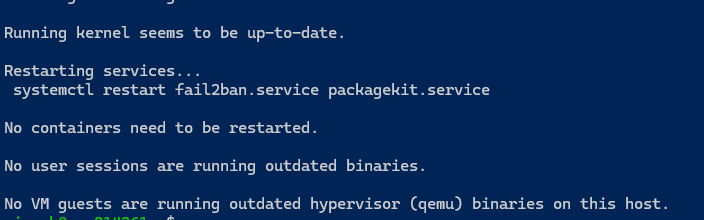
<p class="callout success">I'm now ready to use docker for some of my other projects and also didn't bring down the Bookstack at all while doing this.  
Now I can enable docker with these commands:  
</p>

```bash
sudo systemctl enable docker
sudo systemctl start docker

sudo usermod -aG docker $USER
# Logout and back in or run: su - $USER
```

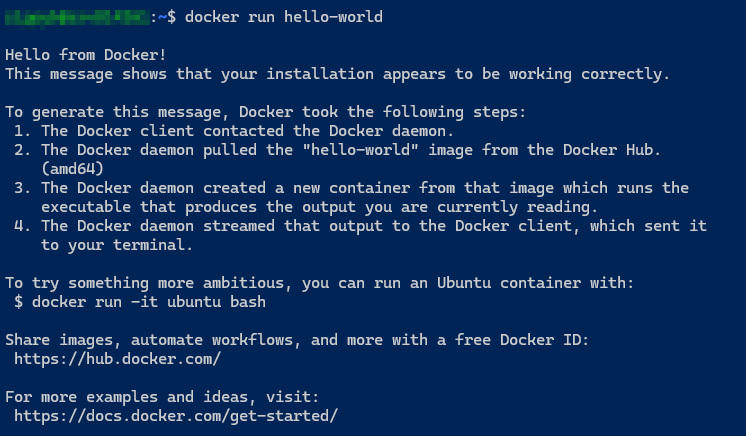
Testing the docker installation:

```bash
docker run hello-world
```

[![2025-05-24 06_42_20-Nathaniel Nash — All Items — 1Password.png](https://docs.natenetworks.com/uploads/images/gallery/2025-05/scaled-1680-/KxphVGCu3vVq5qGo-2025-05-24-06-42-20-nathaniel-nash-all-items-1password.png)](https://docs.natenetworks.com/uploads/images/gallery/2025-05/KxphVGCu3vVq5qGo-2025-05-24-06-42-20-nathaniel-nash-all-items-1password.png)
See the docker compose version:

```bash
docker compose version
```

[![2025-05-24 06_43_55-Editing Page Update #16 - Installin... _ BookStack — Mozilla Firefox.png](https://docs.natenetworks.com/uploads/images/gallery/2025-05/scaled-1680-/5s25IwTnImCWC5vh-2025-05-24-06-43-55-editing-page-update-16-installin-bookstack-mozilla-firefox.png)](https://docs.natenetworks.com/uploads/images/gallery/2025-05/5s25IwTnImCWC5vh-2025-05-24-06-43-55-editing-page-update-16-installin-bookstack-mozilla-firefox.png)

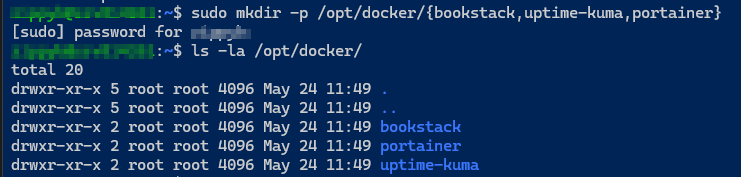
Now I can make some project directories and change ownership and look at this for reference on where the projects will go:

This makes 3 different folder projects:

```bash
sudo mkdir -p /opt/docker/{bookstack,uptime-kuma,portainer}
```

[![2025-05-24 06_50_06-Nathaniel Nash — All Items — 1Password.png](https://docs.natenetworks.com/uploads/images/gallery/2025-05/scaled-1680-/789P9J0ORl2IxHtD-2025-05-24-06-50-06-nathaniel-nash-all-items-1password.png)](https://docs.natenetworks.com/uploads/images/gallery/2025-05/789P9J0ORl2IxHtD-2025-05-24-06-50-06-nathaniel-nash-all-items-1password.png)
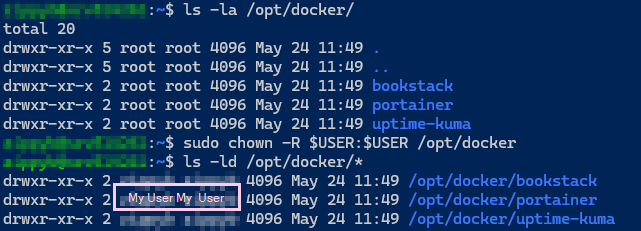
Now I can change ownership to my user for these folders:

```bash
sudo chown -R $USER:$USER /opt/docker
```

[![2025-05-24 06_53_42-Editing Page Update #16 - Installin... _ BookStack — Mozilla Firefox.png](https://docs.natenetworks.com/uploads/images/gallery/2025-05/scaled-1680-/MxbpVymXL5o6W9Xj-2025-05-24-06-53-42-editing-page-update-16-installin-bookstack-mozilla-firefox.png)](https://docs.natenetworks.com/uploads/images/gallery/2025-05/MxbpVymXL5o6W9Xj-2025-05-24-06-53-42-editing-page-update-16-installin-bookstack-mozilla-firefox.png)
I'm officially Docker ready.